Get started / Quickstart
Quickstart
This guide goes from creating your API key to the first lead received on your webhook.
Signal : A watch you create: for example “a chief technology officer (CTO) changes job in France”. Lead : A person or a company the signal delivers to you, with their contact details. The words used in this documentation
You do not write code? You can create and activate a signal from the app, without the API: see step 6, “Activate the signal”.
How to read this documentation
The menu on the left follows your path: Get started (this page), How-to guides (one precise task), Recipes (a complete scenario, from the signal to your tool), Reference (one page per route), then Versions and Agents. The sections point to each other: every reference page lists the guides that call the route, and every guide links to the routes it uses.
1. Sign in to the dashboard
Open your Rodz account at https://app.rodz.io/login and sign in. The dashboard is where you create API keys, get the signing secret of your webhooks and manage connected apps (Claude, for example). In the rest of this guide, you drive signals and their leads through the API.
No account? Self-serve sign-up is closed: ask for an account at https://www.rodz.io/en/get-started/. Vendors, agencies and resellers use https://www.rodz.io/en/partner-access/.
2. Create an API key
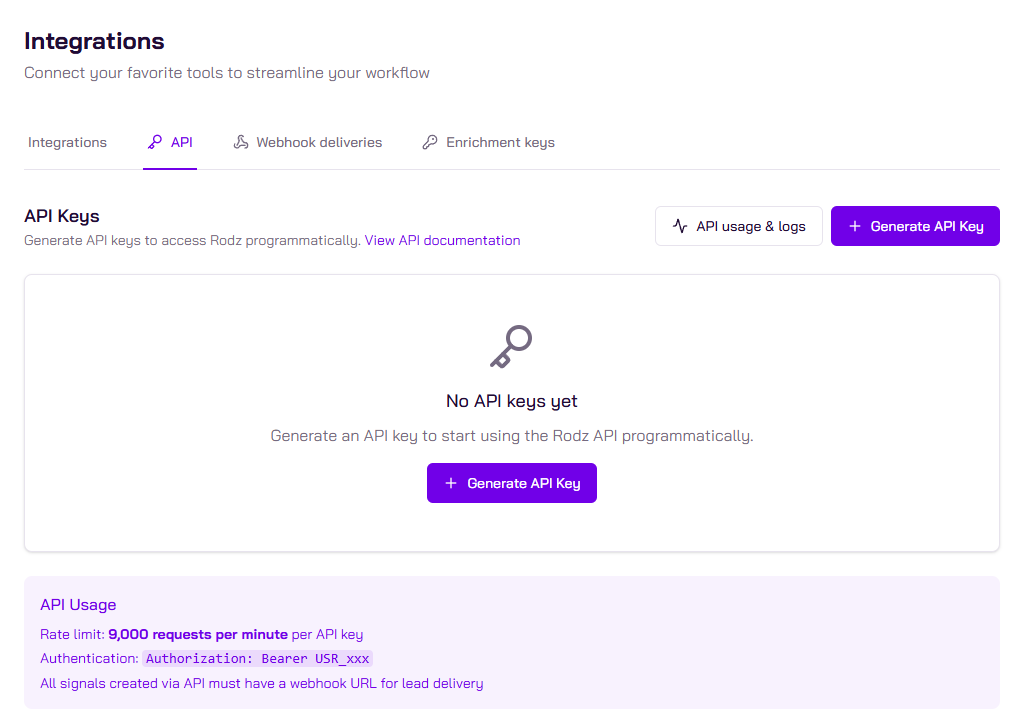
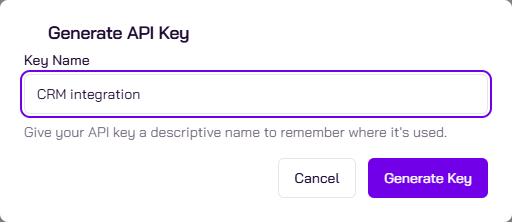
In the dashboard, open Integrations, then API, and create a key. It starts with USR_. Keep it in an environment variable rather than in code.
export RODZ_API_KEY="USR_..."
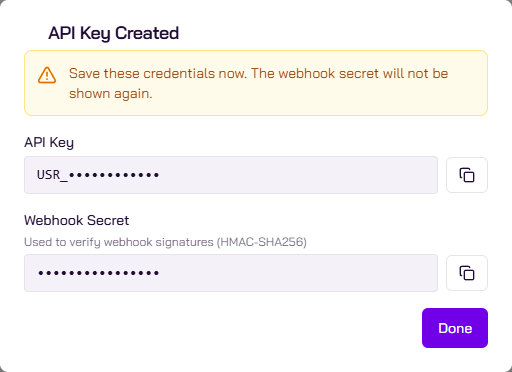
The key’s webhook secret is shown only when you create the key (or regenerate the secret): copy it straight away. The key itself can be copied again later from the table, with the “Copy full API key” action. You can create several keys, one per integration, and delete one without touching the others: deletion is done from the table, asks for confirmation and cannot be undone. Replace USR_... with your key. Do not commit it.
3. Authenticate
Every request sends the key in the Authorization header, as a Bearer token. To check that it works, list your signals: a 200 confirms the key, a 401 rejects it. Helper routes (signal catalogue, test-webhook) answer 403 PARTNER_ACCESS_REQUIRED to a non-partner account: do not use them to test a key.
curl -G "https://api.rodz.io/api/v1/signals" \
  --fail-with-body \
  -H "Authorization: Bearer $RODZ_API_KEY" \
  --data-urlencode "status=active"
import os
import requests

response = requests.get(
    "https://api.rodz.io/api/v1/signals",
    headers={"Authorization": "Bearer " + os.environ["RODZ_API_KEY"]},
    params={"status": "active"},
)
response.raise_for_status()
print(response.status_code, response.text)
# expected status: 200
const url = new URL("https://api.rodz.io/api/v1/signals");
url.search = new URLSearchParams({ "status": "active" }).toString();

const res = await fetch(url, {
  method: 'GET',
  headers: {
    Authorization: `Bearer ${process.env.RODZ_API_KEY}`,
  },
});
if (!res.ok) throw new Error(`HTTP ${res.status}: ${await res.text()}`);
console.log(res.status, await res.text());
// expected status: 200
const apiKey = process.env.RODZ_API_KEY;
if (!apiKey) throw new Error("RODZ_API_KEY is not set");

const url = new URL("https://api.rodz.io/api/v1/signals");
url.search = new URLSearchParams({ "status": "active" }).toString();

const res = await fetch(url, {
  method: 'GET',
  headers: {
    Authorization: `Bearer ${apiKey}`,
  },
});
if (!res.ok) throw new Error(`HTTP ${res.status}: ${await res.text()}`);
console.log(res.status, await res.text());
// expected status: 200
// Java 17 or later, no dependency
import java.net.URI;
import java.net.http.HttpClient;
import java.net.http.HttpRequest;
import java.net.http.HttpResponse;

public class Main {
    public static void main(String[] args) throws Exception {
        HttpRequest request = HttpRequest.newBuilder()
                .uri(URI.create("https://api.rodz.io/api/v1/signals" + "?status=" + "active"))
                .header("Authorization", "Bearer " + System.getenv("RODZ_API_KEY"))
                .GET()
                .build();

        HttpResponse<String> response = HttpClient.newHttpClient()
                .send(request, HttpResponse.BodyHandlers.ofString());
        if (response.statusCode() >= 400) {
            throw new RuntimeException("HTTP " + response.statusCode() + ": " + response.body());
        }
        System.out.println(response.statusCode() + " " + response.body());
        // expected status: 200
    }
}
Reference: GET /api/v1/signals
4. Create your first signal
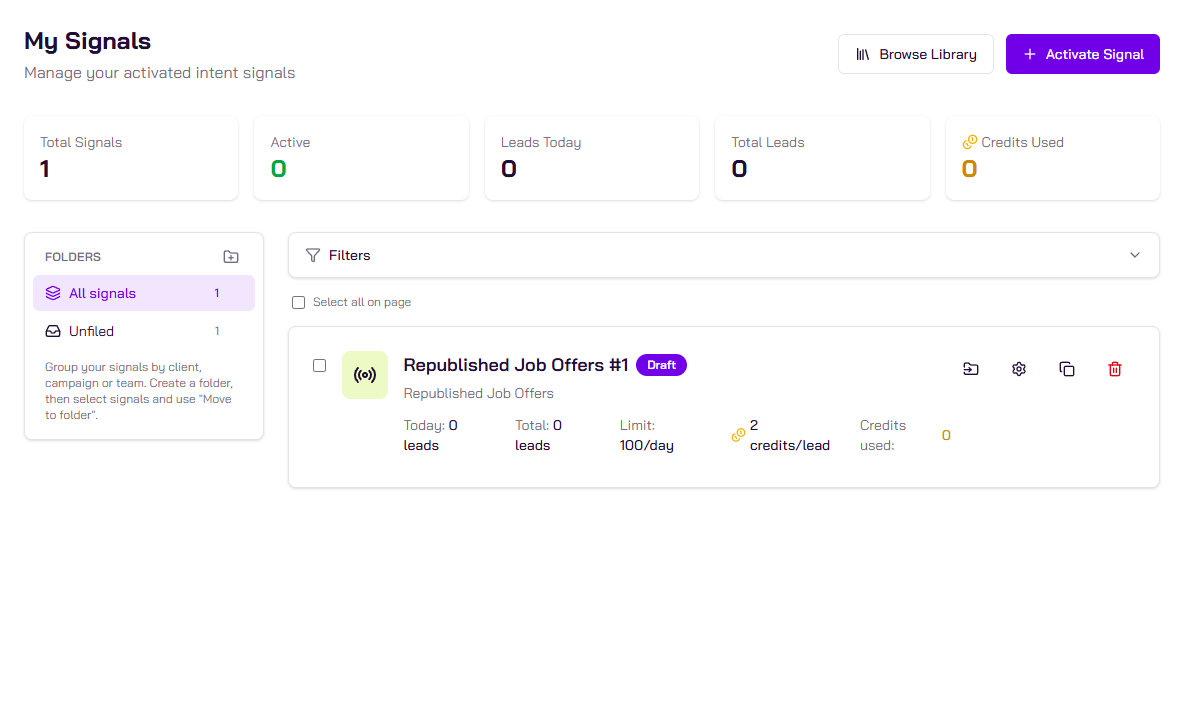
A signal describes what you are looking for. This one finds new CTOs in France: you give it a name, a daily lead limit and criteria. The signal is born as a draft: it produces nothing and costs nothing. It needs no webhook address: you will read its leads through the API in the next steps. The response contains an id field: that is the signal’s identifier. To check that the signal exists, open My Signals in the app: it appears with the Draft status, 0 leads and the daily limit you gave.
curl -X POST https://api.rodz.io/api/v1/signals/job-changes \
  --fail-with-body \
  -H "Authorization: Bearer $RODZ_API_KEY" \
  -H "Content-Type: application/json" \
  -d '{
  "name": "New CTOs in France",
  "dailyLeadLimit": 20,
  "config": {
    "jobTitles": [
      "CTO"
    ],
    "locations": [
      "France"
    ],
    "getEmails": true
  }
}'
import os
import requests

payload = {
    "name": "New CTOs in France",
    "dailyLeadLimit": 20,
    "config": {
        "jobTitles": [
            "CTO",
        ],
        "locations": [
            "France",
        ],
        "getEmails": True,
    },
}

response = requests.post(
    "https://api.rodz.io/api/v1/signals/job-changes",
    headers={"Authorization": "Bearer " + os.environ["RODZ_API_KEY"]},
    json=payload,
)
response.raise_for_status()
print(response.status_code, response.text)
# expected status: 201
const payload = {
  "name": "New CTOs in France",
  "dailyLeadLimit": 20,
  "config": {
    "jobTitles": [
      "CTO"
    ],
    "locations": [
      "France"
    ],
    "getEmails": true
  }
};

const res = await fetch("https://api.rodz.io/api/v1/signals/job-changes", {
  method: 'POST',
  headers: {
    Authorization: `Bearer ${process.env.RODZ_API_KEY}`,
    'Content-Type': 'application/json',
  },
  body: JSON.stringify(payload),
});
if (!res.ok) throw new Error(`HTTP ${res.status}: ${await res.text()}`);
console.log(res.status, await res.text());
// expected status: 201
const apiKey = process.env.RODZ_API_KEY;
if (!apiKey) throw new Error("RODZ_API_KEY is not set");

const payload: Record<string, unknown> = {
  "name": "New CTOs in France",
  "dailyLeadLimit": 20,
  "config": {
    "jobTitles": [
      "CTO"
    ],
    "locations": [
      "France"
    ],
    "getEmails": true
  }
};

const res = await fetch("https://api.rodz.io/api/v1/signals/job-changes", {
  method: 'POST',
  headers: {
    Authorization: `Bearer ${apiKey}`,
    'Content-Type': 'application/json',
  },
  body: JSON.stringify(payload),
});
if (!res.ok) throw new Error(`HTTP ${res.status}: ${await res.text()}`);
console.log(res.status, await res.text());
// expected status: 201
// Java 17 or later, no dependency
import java.net.URI;
import java.net.http.HttpClient;
import java.net.http.HttpRequest;
import java.net.http.HttpResponse;

public class Main {
    public static void main(String[] args) throws Exception {
        String payload = """
                {
                  "name": "New CTOs in France",
                  "dailyLeadLimit": 20,
                  "config": {
                    "jobTitles": [
                      "CTO"
                    ],
                    "locations": [
                      "France"
                    ],
                    "getEmails": true
                  }
                }
                """;

        HttpRequest request = HttpRequest.newBuilder()
                .uri(URI.create("https://api.rodz.io/api/v1/signals/job-changes"))
                .header("Authorization", "Bearer " + System.getenv("RODZ_API_KEY"))
                .header("Content-Type", "application/json")
                .POST(HttpRequest.BodyPublishers.ofString(payload))
                .build();

        HttpResponse<String> response = HttpClient.newHttpClient()
                .send(request, HttpResponse.BodyHandlers.ofString());
        if (response.statusCode() >= 400) {
            throw new RuntimeException("HTTP " + response.statusCode() + ": " + response.body());
        }
        System.out.println(response.statusCode() + " " + response.body());
        // expected status: 201
    }
}
Reference: POST /api/v1/signals/job-changes
5. Keep the signal id
Copy the value of the id field from the step 4 response and store it in an environment variable: the next two steps put it in the route address. You can also find it at any time with GET /api/v1/signals.
export SIGNAL_ID="<the id returned in step 4>"
Replace the text between angle brackets with your identifier.
6. Activate the signal
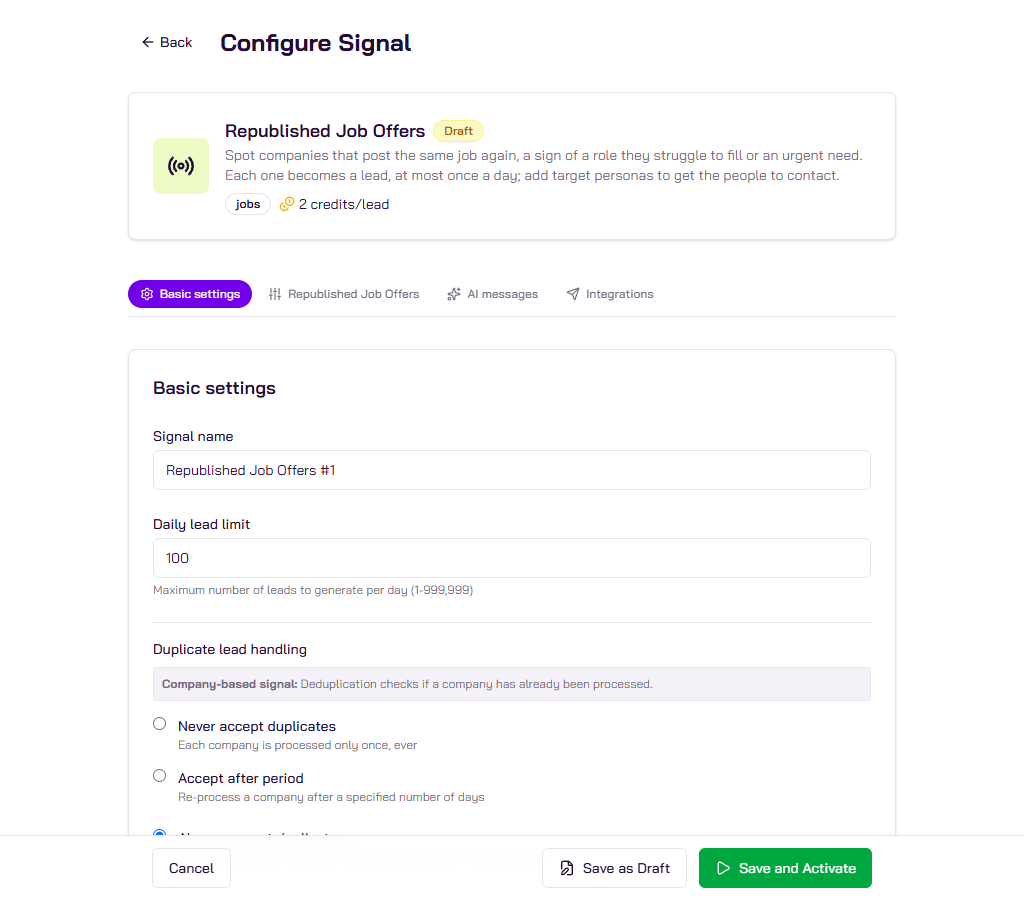
To receive real leads, set the status to active. From then on, every delivered lead uses credits (see “Credits” below). To stop, send {"status":"paused"} to the same place. Without code, from the app: open My Signals, click Activate Signal, pick a signal in the library and click Activate. The Configure Signal screen opens on a draft: fill in the name, the daily lead limit and the criteria of that signal (for Job Changes: the new-role titles to follow or custom titles, otherwise activation is refused; look-back in months, company size and excluded titles are optional), then click Save and Activate (or Save as Draft to carry on later). Your credit balance is shown at the bottom of the left menu, with a link to buy more. The leads you get are read in Leads (left menu), which also offers Export CSV; Webhook deliveries tracks what is sent to your webhook. Each card in the library shows the signal’s price in credits per lead: compare them before activating.
curl -X PATCH https://api.rodz.io/api/v1/signals/$SIGNAL_ID \
  --fail-with-body \
  -H "Authorization: Bearer $RODZ_API_KEY" \
  -H "Content-Type: application/json" \
  -d '{
  "status": "active"
}'
import os
import requests

payload = {
    "status": "active",
}

response = requests.patch(
    "https://api.rodz.io/api/v1/signals/" + os.environ["SIGNAL_ID"],
    headers={"Authorization": "Bearer " + os.environ["RODZ_API_KEY"]},
    json=payload,
)
response.raise_for_status()
print(response.status_code, response.text)
# expected status: 200
const payload = {
  "status": "active"
};

const res = await fetch(`https://api.rodz.io/api/v1/signals/${process.env.SIGNAL_ID}`, {
  method: 'PATCH',
  headers: {
    Authorization: `Bearer ${process.env.RODZ_API_KEY}`,
    'Content-Type': 'application/json',
  },
  body: JSON.stringify(payload),
});
if (!res.ok) throw new Error(`HTTP ${res.status}: ${await res.text()}`);
console.log(res.status, await res.text());
// expected status: 200
const apiKey = process.env.RODZ_API_KEY;
if (!apiKey) throw new Error("RODZ_API_KEY is not set");
const signalId = process.env.SIGNAL_ID;
if (!signalId) throw new Error("SIGNAL_ID is not set");

const payload: Record<string, unknown> = {
  "status": "active"
};

const res = await fetch(`https://api.rodz.io/api/v1/signals/${signalId}`, {
  method: 'PATCH',
  headers: {
    Authorization: `Bearer ${apiKey}`,
    'Content-Type': 'application/json',
  },
  body: JSON.stringify(payload),
});
if (!res.ok) throw new Error(`HTTP ${res.status}: ${await res.text()}`);
console.log(res.status, await res.text());
// expected status: 200
// Java 17 or later, no dependency
import java.net.URI;
import java.net.http.HttpClient;
import java.net.http.HttpRequest;
import java.net.http.HttpResponse;

public class Main {
    public static void main(String[] args) throws Exception {
        String payload = """
                {
                  "status": "active"
                }
                """;

        HttpRequest request = HttpRequest.newBuilder()
                .uri(URI.create("https://api.rodz.io/api/v1/signals/" + System.getenv("SIGNAL_ID")))
                .header("Authorization", "Bearer " + System.getenv("RODZ_API_KEY"))
                .header("Content-Type", "application/json")
                .method("PATCH", HttpRequest.BodyPublishers.ofString(payload))
                .build();

        HttpResponse<String> response = HttpClient.newHttpClient()
                .send(request, HttpResponse.BodyHandlers.ofString());
        if (response.statusCode() >= 400) {
            throw new RuntimeException("HTTP " + response.statusCode() + ": " + response.body());
        }
        System.out.println(response.statusCode() + " " + response.body());
        // expected status: 200
    }
}
Reference: PATCH /api/v1/signals/{signal_id}
7. Read your first leads
This route returns the leads the signal delivered, newest first. While no lead has been produced, total is 0: call again later. To receive leads as they happen instead of reading them, see “Receive leads on a webhook” below.
curl -G "https://api.rodz.io/api/v1/signals/$SIGNAL_ID/leads" \
  --fail-with-body \
  -H "Authorization: Bearer $RODZ_API_KEY" \
  --data-urlencode "since=2026-10-07T00:00:00+00:00"
import os
import requests

response = requests.get(
    "https://api.rodz.io/api/v1/signals/" + os.environ["SIGNAL_ID"] + "/leads",
    headers={"Authorization": "Bearer " + os.environ["RODZ_API_KEY"]},
    params={"since": "2026-10-07T00:00:00+00:00"},
)
response.raise_for_status()
print(response.status_code, response.text)
# expected status: 200
const url = new URL(`https://api.rodz.io/api/v1/signals/${process.env.SIGNAL_ID}/leads`);
url.search = new URLSearchParams({ "since": "2026-10-07T00:00:00+00:00" }).toString();

const res = await fetch(url, {
  method: 'GET',
  headers: {
    Authorization: `Bearer ${process.env.RODZ_API_KEY}`,
  },
});
if (!res.ok) throw new Error(`HTTP ${res.status}: ${await res.text()}`);
console.log(res.status, await res.text());
// expected status: 200
const apiKey = process.env.RODZ_API_KEY;
if (!apiKey) throw new Error("RODZ_API_KEY is not set");
const signalId = process.env.SIGNAL_ID;
if (!signalId) throw new Error("SIGNAL_ID is not set");

const url = new URL(`https://api.rodz.io/api/v1/signals/${signalId}/leads`);
url.search = new URLSearchParams({ "since": "2026-10-07T00:00:00+00:00" }).toString();

const res = await fetch(url, {
  method: 'GET',
  headers: {
    Authorization: `Bearer ${apiKey}`,
  },
});
if (!res.ok) throw new Error(`HTTP ${res.status}: ${await res.text()}`);
console.log(res.status, await res.text());
// expected status: 200
// Java 17 or later, no dependency
import java.net.URI;
import java.net.http.HttpClient;
import java.net.http.HttpRequest;
import java.net.http.HttpResponse;

public class Main {
    public static void main(String[] args) throws Exception {
        HttpRequest request = HttpRequest.newBuilder()
                .uri(URI.create("https://api.rodz.io/api/v1/signals/" + System.getenv("SIGNAL_ID") + "/leads" + "?since=" + "2026-10-07T00%3A00%3A00%2B00%3A00"))
                .header("Authorization", "Bearer " + System.getenv("RODZ_API_KEY"))
                .GET()
                .build();

        HttpResponse<String> response = HttpClient.newHttpClient()
                .send(request, HttpResponse.BodyHandlers.ofString());
        if (response.statusCode() >= 400) {
            throw new RuntimeException("HTTP " + response.statusCode() + ": " + response.body());
        }
        System.out.println(response.statusCode() + " " + response.body());
        // expected status: 200
    }
}
Reference: GET /api/v1/signals/{signal_id}/leads
Credits
A draft signal costs nothing. An active signal uses credits for every delivered lead, and the price depends on the signal. In the app, the price per lead is shown on each card of the signal library and on the Configure Signal screen (“credits/lead”); your balance is at the bottom of the left menu, with the “Buy more credits” link. Through the API, each signal’s price is in the GET /api/v1/signal-types catalog, which is for partner accounts only, and may be negotiated for your account. An email found (getEmails option) costs 0.5 credit more, only when it is found. Credits never expire. Read your balance with GET /api/v1/account/credits. When the balance is not enough, the API answers 402 and charges nothing: INSUFFICIENT_CREDITS for a signal or a phone lookup, NO_MORE_CREDITS for the other enrichment lookups.
Receive leads on a webhook
A webhook is an HTTPS address on your server: Rodz sends it every delivered lead, signed, as soon as it is qualified. Set it in the webhookUrl field when you create the signal, or later with PATCH. The guide below shows a complete receiver that verifies the signature.
The words used in this documentation
- Signal
- A watch you create: for example “a chief technology officer (CTO) changes job in France”.
- Lead
- A person or a company the signal delivers to you, with their contact details.
- Webhook
- An address on your server to which Rodz sends every lead in a POST request.
- Credit
- The unit that pays for leads and enrichments. The cost depends on the signal.
- Draft, active, paused
- The three statuses of a signal. Only an active signal produces leads.
- Enrichment
- A route that completes a record: find an email, a phone number, a company’s details.
- Persona
- A job title you target, for example CTO or sales director.
Errors and limits
Every error returns an HTTP code and a JSON body. These are the ones you will meet first.
401 The key is missing, malformed or revoked. Check the Authorization header. 402 The credit balance is not enough. Nothing is charged. The code is INSUFFICIENT_CREDITS for a signal or a phone lookup, NO_MORE_CREDITS for the other enrichment lookups. 422 The request body does not match the schema. The response names the faulty field. 429 Too many requests. A key can send 9,000 requests per clock minute; above that, the response carries the code RATE_LIMIT_EXCEEDED and a Retry-After header giving the seconds to wait until the next minute (1 to 60). A refused request is not charged. Helper routes have a lower cap: 60 per minute per key for the catalogue (30 for the funnel, 10 for test-webhook), plus a daily cap per account (code HELPER_RATE_LIMIT_EXCEEDED). Input limits
Every field in the reference shows its constraints (maxLength, maxItems, minimum…). Stay under these values: above them, the request may be refused. The limits below are not in the spec, the server already applies them; they come on top of the bounds the spec declares itself. The name in parentheses is the request schema, click it to see all its fields.
webhookUrl 500 characters (every signal creation route) linkedinProfileUrls 500 items
(
PersonConnectionsConfig , MutualConnectionsConfig
)
companyUrls 10 items
(
CompanyEmployeesAlumniConfig
)
schoolUrls 10 items
(
SchoolAlumniConfig
)
sourceProfiles 500 items
(
WarmIntrosConfig
)
linkedinCompanyUrls 20 items
(
NewCompanyFollowersConfig
)
Error format
An error does not always have the same shape: depending on who produces it, the JSON body takes one of the four forms below. Read the HTTP status, then error.code, which is stable; the message is meant to be displayed, not compared.
Route error 401
The most common shape: authentication, credits, access rights, limits, conflicts, resource not found, rejected request. The detail always carries error.code (stable, test on it) and error.message (display it). Some errors add fields next to message, such as missing_fields or limit.
{
  "detail": {
    "error": {
      "code": "INVALID_API_KEY",
      "message": "Invalid or revoked API key"
    }
  }
}
Request validation 422
The body, a path parameter or a query parameter breaks the schema. Here the error is not inside detail: error.details names the first field at fault. Same shape for the internal error (500 INTERNAL_ERROR) and the database being unavailable (503 SERVICE_UNAVAILABLE), which add error.request_id: give it to support. Same shape too for a busy enrichment lookup (429 TOO_MANY_CONCURRENT_REQUESTS) and the 502 SERVICE_ERROR.
{
  "error": {
    "code": "VALIDATION_ERROR",
    "message": "Validation failed: Field required",
    "details": {
      "field": "name",
      "message": "Field required"
    }
  }
}
Unknown route or method not allowed 404
The server answers with plain text, without a code. Happens on a URL that does not exist (404) or an HTTP method that is not allowed (405).
{
  "detail": "Not Found"
}
Request body too large 413
The body exceeds the allowed size: 5 MB, or 20 MB on the /api/v1/signals routes. Here error is a string, without a code; max_size_mb gives the ceiling. The check reads the Content-Length header before any processing.
{
  "error": "Request body too large",
  "max_size_mb": 5
}
Error headers
Retry-After 429, 503 Seconds to wait before retrying. Present on rate limits, the daily phone lookup limit and temporary outages. WWW-Authenticate 401 Is Bearer, the expected authentication scheme. X-Lookup-Status 200, 422 Is unavailable when an enrichment lookup could not complete this time: a missing result is not conclusive, retry later. On PUT /integrations/{provider} it comes with a 422 INVALID_API_KEY whose key could not be checked ("reason": "unavailable"). Error codes
The codes the public routes return, by status. Messages are in English.
400 MISSING_REQUIRED_FIELDS Cannot activate: required fields are missing. The response lists missing_fields. 400 MISSING_PARAMETERS No search parameter provided. 400 INVALID_PARAMETER A parameter has a rejected value. 400 INVALID_STATUS Unknown signal status. 400 INVALID_LOCATION Unrecognised location. 400 SIGNAL_INACTIVE The signal is not active. 400 WRONG_WATCHLIST_KIND This watchlist watches companies, not people (or the reverse): use the other set of routes. 400 USE_DASHBOARD_OAUTH This connection is made from the dashboard (OAuth), not through the API. 401 MISSING_API_KEY No key in the Authorization: Bearer … header. 401 INVALID_API_KEY Unknown or revoked key. 402 NO_MORE_CREDITS Paid enrichment routes: the balance does not cover the call, nothing is charged. Buy a credit pack (credits never expire). 402 INSUFFICIENT_CREDITS One-time extraction of a signal: not enough credits. error.estimate gives the shortfall. 403 PARTNER_ACCESS_REQUIRED Route reserved for partner accounts (catalogues, test-webhook…). 403 FEATURE_NOT_ENABLED Feature not enabled on the account. 404 NOT_FOUND The resource does not exist, or does not belong to this account. 404 UNKNOWN_PROVIDER Unknown integration. 409 IDEMPOTENCY_KEY_REUSED This Idempotency-Key was already used with a different body. 409 INTEGRATION_NOT_CONNECTED The requested integration is not connected. 409 IMPORT_IN_PROGRESS A list import is already running on this watchlist. 422 VALIDATION_ERROR The body or a parameter breaks the schema (error shape, see above). 422 UNKNOWN_FIELDS Some requested fields do not exist for this signal. 422 INVALID_API_KEY The integration key provided is refused, or could not be checked (reason: unavailable). 429 RATE_LIMIT_EXCEEDED Too many requests for this key. Wait Retry-After seconds. 429 HELPER_RATE_LIMIT_EXCEEDED Too many calls to this helper route (per-minute limit per key). 429 DAILY_PHONE_LOOKUP_LIMIT Daily phone lookup limit reached. The response gives limit, usedToday and resetsAt. 429 TOO_MANY_CONCURRENT_REQUESTS Too many enrichment lookups in progress: the server waited about 20 seconds for a free slot. error shape. 500 INTERNAL_ERROR Unexpected internal error. error shape, with request_id. 502 SERVICE_ERROR An enrichment lookup could not complete. error shape. 503 SERVICE_UNAVAILABLE Service briefly unavailable (database unreachable), usually a few seconds. error shape, with request_id and Retry-After: 5. 503 HELPER_RATE_LIMIT_UNAVAILABLE The helper route limit check is temporarily unavailable. Retry after Retry-After. 503 PHONE_LOOKUP_UNAVAILABLE Phone lookup temporarily unavailable: nothing is submitted or charged. Read an error, whatever its shape
This code handles the four shapes. It depends neither on the language of the message nor on its wording.
// Lire une erreur : branchez-vous sur le statut HTTP et sur error.code, jamais sur le message.
async function readError(res: Response) {
  const body = await res.json().catch(() => ({}));
  const error = body?.detail?.error ?? (typeof body?.error === 'object' ? body.error : null);
  const text = typeof body?.detail === 'string' ? body.detail : typeof body?.error === 'string' ? body.error : null;
  return {
    status: res.status,
    code: error?.code ?? null,
    message: error?.message ?? text ?? res.statusText,
    requestId: error?.request_id ?? null,
    retryAfter: Number(res.headers.get('Retry-After')) || null,
  };
}
Next
For a specific task, open a how-to . For a complete scenario, a recipe . For the detail of a route, the reference . To plug in an agent, see the page Agents .