Create a Job Changes signal in Rodz, filtered on your personas and ICP, then turn on HubSpot in the signal’s Integrations tab. Every decision-maker who starts a new role lands in HubSpot as a contact linked to their new company, with the signal name, the date and the matched persona in dedicated properties. A lead costs 2 credits, plus 0.5 credit when an email is found.
Key facts
A job change costs 2 credits per lead, plus 0.5 credit per email found (getEmails), charged on success only.
A new role is delivered up to 180 days after its start date, never less (maxJobAgeDays, minimum 180).
Rodz identifies 400,000+ signals a month (July to September 2026 average).
HubSpot connects once through OAuth, then you switch it on signal by signal: no key to copy.
Cost : 2 credits per lead (+0.5 credit per email found) Setup time : 10 min
Before you start
A Rodz account with credits (the test account includes 100).
A HubSpot account where you can install an app (admin or super admin rights).
The roles you target (for example "Sales Director", "CTO") and your ICP: size, industry, country.
Steps
Step 1.
Connect HubSpot to Rodz
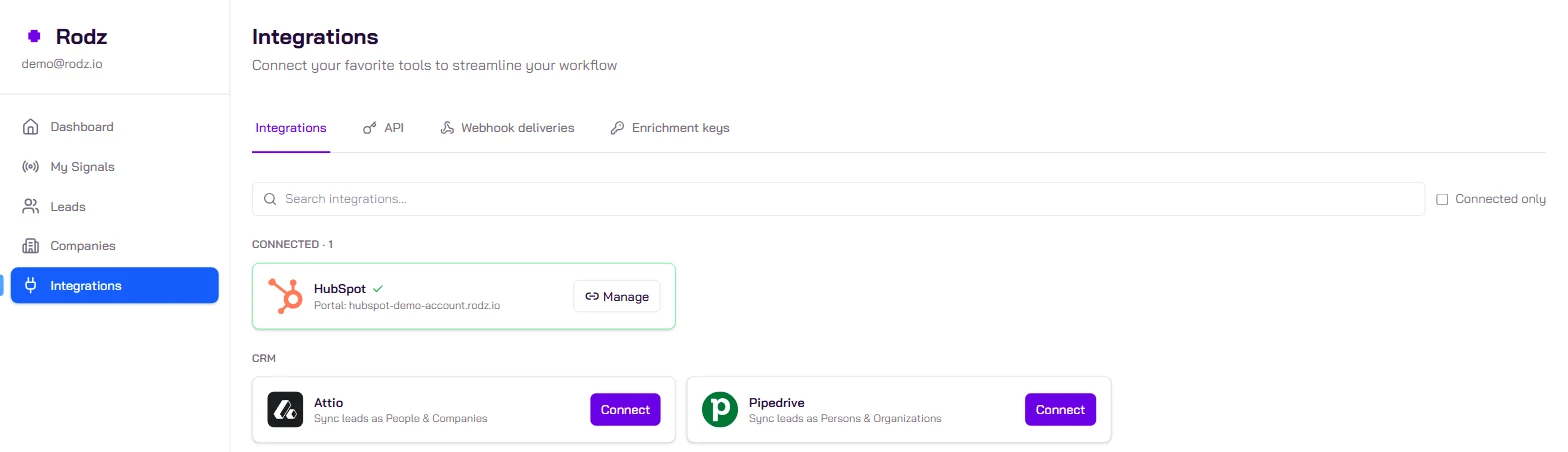
In the Rodz dashboard, open Integrations in the left menu and click HubSpot. A HubSpot window opens: pick the portal and allow access. The connection covers the whole account; you then choose which signals use it.
Rodz creates the properties it needs in HubSpot itself (last_signal, last_signal_date, matched_persona...). Nothing to prepare by hand.
Step 2.
Create the Job Changes signal
In My Signals, click Activate Signal and pick the Job Changes signal. In the signal’s tab, set:
the roles to follow (preset personas and custom titles). Titles are matched by meaning and level, in any language: a "Sales Director" target accepts a "Directeur commercial" and a VP Sales, not a plain manager;
the size and industry of the new employer;
the locations: this is the person’s profile location, not the company headquarters.
Step 3.
Set the daily limit and duplicate handling
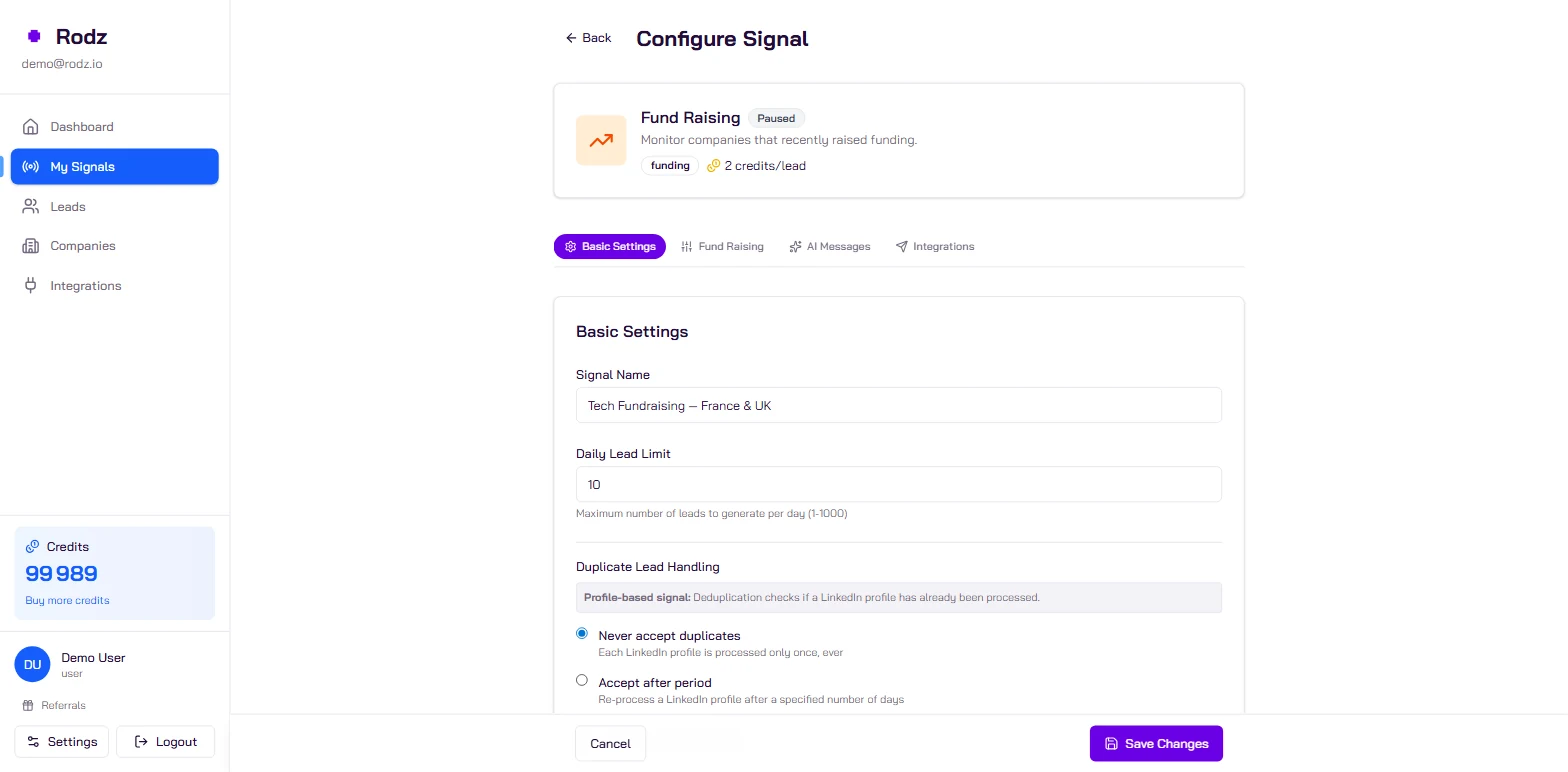
In Basic Settings, set the Daily Lead Limit: it is the signal’s daily spending cap. For a CRM, choose Never accept duplicates (duplicateHandling: refuse): a person is delivered once, even if they move again within the 180-day window.
Tick Get emails if you want the professional email in HubSpot (0.5 credit per email found).
Step 4.
Turn on HubSpot for this signal
Open the signal’s Integrations tab, switch on HubSpot and save. Through the API, it is a PATCH on the signal with the hubspot destination.
Step 5.
Activate the signal and check the first lead
Set the signal to Active. Leads arrive as changes are detected. In HubSpot, filter contacts on the Last Signal property (your signal’s name): each contact is associated with their new company and carries a note describing the move.
To read leads without opening HubSpot, GET /api/v1/signals/{signal_id}/leads returns them in the webhook format.
Example payload
What Rodz delivers for one lead (webhook format, also returned by `GET /api/v1/signals/{signal_id}/leads`). HubSpot receives the contact and company fields.
The details of the move (previous role, previous company, start date) are written in a note on the contact.
What to do with these contacts
A decision-maker who joins a company reviews tools and contracts in their first months. Two simple uses in HubSpot:
An active list “Last Signal = New sales leaders in SaaS” and a workflow that creates a task for the account owner.
Champion tracking: a contact who was a customer at their previous employer and joins a target account is a warm introduction. Cross previous_company with your customers.
No contact arrives: check that HubSpot is switched on in the signal’s Integrations tab (connecting the account is not enough) and that the signal is Active.
Contacts without email: email finding is off, or no email was found (not charged).
Too few leads: open the signal’s funnel; the location filter applies to the person, and a profile with no location is dropped when a location is required.
Frequently asked questions
Does Rodz create duplicates in HubSpot?
No. Rodz creates or updates the contact and the company: an existing contact is updated, not recreated. On the Rodz side, "Never accept duplicates" stops the same person from being delivered twice.
Which HubSpot properties are filled?
The standard ones (first name, last name, email, phone, job title, company, website) and Rodz properties: last_signal (signal name), last_signal_date, signal_heat_score, matched_persona and sales_nav_url. A note describes the job change.
Can I send only some leads to HubSpot?
The signal’s filters decide what is delivered: roles, size, industry, location, excluded companies. Every lead the signal delivers goes to HubSpot. For finer routing, build a HubSpot active list on last_signal, or use a webhook.
How many leads will I get a day?
It depends on your filters and your market. The daily limit sets the maximum. If the signal is quiet, its funnel (GET /api/v1/signals/{signal_id}/funnel) shows which filter removes the most candidates.
How recent is the job change?
Rodz delivers a role up to 180 days after its start date. Test freshness on new_job_started_on or new_job_start_month, not on previous_job_ended_on: they differ when there was a gap between two jobs.